If you start noticing that your phone is acting strangely, such as its temperature rising for no apparent reason, the battery draining unusually quickly, or applications appearing that you did not install, it is likely due to malware.
Smartphones have become an increasing target for cyber attacks, with malicious software seeking to steal your personal information, drain your balance, or disrupt the device’s operation, according to the “Thomas Guide” website.
Before resorting to downloading antivirus applications or paying any fees, tech experts believe that most phone viruses can be eliminated with simple and free steps that only take a few minutes. Although Android phones are more susceptible due to their open-source nature, iPhones are not immune to these risks.
Signs of a Virus:
Before starting the treatment process, it is best to first make sure that the problem is actually caused by malware, as not all performance problems mean there is a virus. Among the most prominent warning signs:
Abnormal battery drain: If the phone loses 30 to 40% of its charge within one hour with limited use, there may be programs running in the background without your knowledge.
Phone overheating without heavy use: High phone temperature in idle mode or when performing simple tasks such as messaging may indicate abnormal activity.
Unknown applications appearing: Many malware programs disguise themselves as applications with familiar names or icons.
Unexpected charges or data consumption: Some viruses send paid messages or connect to external servers, which appears on the bill.
Many pop-up windows: The appearance of pop-up ads even when the browser is closed is clear evidence of malicious adware.
Frequent application crashes: Frequent crashes may be the result of malware interfering with the operating system.
1- Clear browser data and cache
Not all malware installs itself as applications. Often, the problem starts with the browser, where malicious sites or ads store data that leads to pop-up windows or fake virus warnings.
On Android phones: Open Settings, go to Applications, choose the browser (such as Chrome or Firefox), tap Storage, then Clear Cache and Clear Data. It is recommended to repeat this step for each browser you use.
On iPhones: Go to Settings, then Clear History and Website Data, Safari. It is also advisable to check the Downloads folder and delete any unknown files, especially APK files on Android, as they are a common way for malware to infiltrate from outside the official app store.
2- Start the phone in safe mode and delete suspicious applications
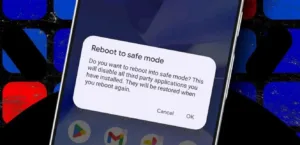
If the previous step does not solve the problem, the reason may be a malicious application. On Android devices, the phone can be restarted in safe mode, which disables all third-party applications and runs only the basic system. If the symptoms disappear while the phone is running in this mode, this is clear evidence of a harmful application. The list of applications should be reviewed and any unknown program deleted, then the phone should be restarted normally.
As for iPhones, although there is no traditional safe mode, installing the latest iOS update closes the security vulnerabilities exploited by malware. After that, the storage space can be reviewed and unfamiliar applications deleted, and also check for any profiles or VPN networks that the user did not install themselves.
3 – Factory reset as a last resort
If the problem persists despite all the previous steps, a factory reset is the last and most effective solution. This procedure returns the phone to its original state and removes any malware deeply embedded in the system. Before performing a reset, it is preferable to save a backup copy of the basic data such as photos and contacts, while avoiding restoring applications, to avoid the virus returning again. After the reset, the phone should be set up as a new device, and applications should be downloaded manually from official stores only, paying attention to any abnormal behavior to ensure the phone’s security.
Although a factory reset is considered a radical step, it often achieves the desired result, restores the phone’s normal performance, and secures it against continuous threats, making smart devices safer and more reliable in daily use.